How to Hook Up a Car Battery Charger: Clamp Order and Settings
JupiterVehicles is reader-supported. As an Amazon Associate, we earn from qualifying purchases.
Hooking up a car battery charger takes two minutes once you know the order. The two rules that matter most: connect the clamps before you plug the charger in, and unplug it before you take the clamps off. This guide covers the connection steps, settings and a handy shortcut for chargers you use often.
For the full charging process, including charge times, see how long to charge a car battery.
Table of Contents
Before You Start
- Read your car’s owner’s manual and the charger’s manual. Some cars specify jump posts or ground points.
- Work in a well-ventilated area. Consumer Reports notes that batteries can emit harmful and explosive gases.
- Wear safety glasses.
- Turn off the car and remove the key.
- Make sure the charger is unplugged and switched off.
- Check the battery. Don’t charge one that’s cracked, leaking, swollen or frozen.
How to Hook Up a Car Battery Charger
- Identify the terminals. Positive is marked + and often has a red cover. Negative is marked -.
- Clean the terminals if they’re corroded, using a wire brush.
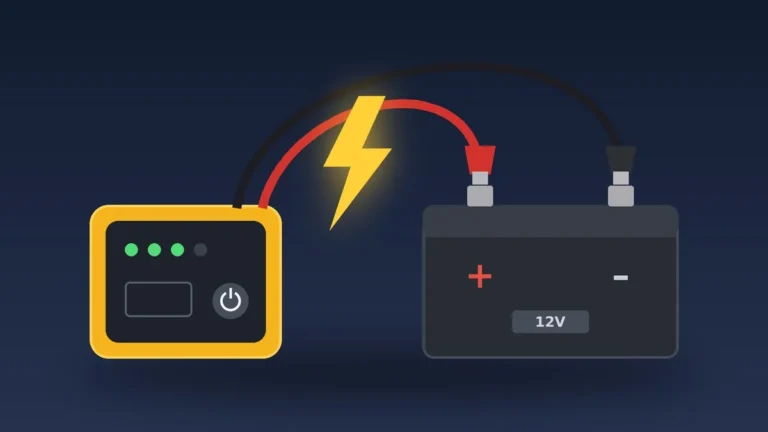
- Connect the red clamp to positive (+). Make sure it bites onto clean metal.
- Connect the black clamp. Use the negative (-) terminal if the battery is out of the car or your manual allows it. Otherwise use an unpainted metal ground point on the engine or chassis, away from the battery.
- Choose the settings. Select 12V, then the battery type (standard/flooded, AGM, or lithium if supported) and charge rate if your charger asks.
- Plug in the charger and switch it on.
- Watch for the charging indicator. Smart chargers begin automatically.
How to Disconnect a Car Battery Charger
- Unplug the charger or switch it off.
- Remove the black clamp first.
- Remove the red clamp.
- Store the clamps so they can’t touch each other.
Where to Route the Cable
Consumer Reports suggests running the cable into the engine bay with the hood resting ajar, not closed on the wires, and not hiding the cable through the grille, so no one drives off with the charger still connected.
Use Quick-Connect Leads for Regular Charging
Many smart chargers come with ring-terminal leads (sometimes called pigtails) that stay bolted to the battery. You just plug the charger into the lead. Consumer Reports says these can be safer than clips because they reduce the chance of an underhood spark.
Cars With Hidden Batteries
If your battery is in the trunk, under a seat or under the floor, the manual may tell you to use remote jump posts under the hood. Connect red to the positive post and black to the marked ground.
Common Mistakes
- Plugging in the charger before connecting the clamps
- Reversing the clamps
- Choosing the wrong battery type, especially for AGM
- Closing the hood on the cables
- Charging in an enclosed space without ventilation

- MEET THE GENIUS5 — Similar to our G3500, just better. It's 34% smaller and delivers over 65% more power. It's the all-in-one charging solution - battery charger, battery maintainer, trickle charger, plus desulfator.
- DO MORE WITH GENIUS — Designed for 6-volt and 12-volt lead-acid (AGM, Gel, SLA, VRLA) and lithium-ion (LiFePO4) batteries, including flooded, maintenance-free, deep-cycle, marine and powersport batteries.
- ENJOY PRECISION CHARGING — An integrated thermal sensor dynamically adjusts the charge based on ambient temperature, preventing overcharging in hot weather and undercharging in cold, ensuring optimal battery performance.
- CHARGE DEAD BATTERIES — Charge batteries from as low as 1 volt, or use Force Mode to manually charge completely dead batteries down to zero volts. Perfect for recovering deeply discharged or neglected batteries.
- BEYOND MAINTENANCE — Keep your battery fully charged without worrying about overcharging. Our smart charger constantly monitors the battery, allowing you to leave it connected safely - indefinitely - for worry-free maintenance.

Frequently Asked Questions
Do I connect the charger to the battery or the ground?
Red goes to the positive terminal. Black goes to the negative terminal or a ground point, depending on your manual and the charger instructions.
Should the car be on when charging the battery?
No. Turn the car off and remove the key before connecting a charger.
Do I need to disconnect the battery to charge it?
Usually not with modern smart chargers. Check your owner’s manual for any vehicle-specific advice.
What happens if I hook up the charger backwards?
Many smart chargers have reverse-polarity protection and won’t start. Basic chargers may blow a fuse or cause damage, so double-check before plugging in.
The Bottom Line
To hook up a car battery charger, keep it unplugged, connect red to positive and black to negative or ground, choose 12V and the battery type, then plug it in. To disconnect, unplug first, then remove black and red.