
How Do Dash Cams Work? Recording, Power, and Parking Mode Explained
A dash cam works by recording video continuously while you drive, saving it in short clips on a memory card, and overwriting the oldest clips when the card fills up. That’s called loop recording. A built-in motion sensor (G-sensor) detects sudden impacts or hard braking and locks the clip from that moment so it can’t be overwritten. Most dash cams start recording automatically when the car turns on, powered through the 12V socket, a USB port, or a hardwire kit connected to the fuse box.
Here’s how each part of that process works.
Table of Contents
The Basic Parts of a Dash Cam
| Part | What it does |
|---|---|
| Lens | Sets the field of view, usually wide angle |
| Image sensor | Captures light; affects night video quality |
| Processor | Turns the sensor data into compressed video files |
| microSD card | Stores the video clips |
| G-sensor (accelerometer) | Detects impacts and locks important clips |
| Power source | 12V socket, USB, hardwire kit, or OBD adapter |
| Supercapacitor or battery | Keeps the camera running long enough to save the last clip |
| Optional: GPS, Wi-Fi, app | Adds speed and location data and lets you view clips on your phone |
Step 1: Recording Starts Automatically
When you start the car, power flows to the camera and it begins recording. You don’t need to press anything. When you turn the car off, the camera saves its last clip and shuts down, unless it’s set up for parking mode.
Step 2: Loop Recording Keeps the Card From Filling Up
Dash cams record in short segments, often one to three minutes long. When the memory card is full, the camera deletes the oldest unlocked segment to make room for new video. That means you never need to clear the card manually, but it also means everyday footage is temporary.
California’s vehicle code describes this same behavior in its definition of a video event recorder: a device that “continuously records in a digital loop” and saves video when triggered by unusual motion or a crash (California Vehicle Code section 26708).
Step 3: The G-Sensor Protects Important Clips
A G-sensor measures sudden changes in movement. When it detects a jolt, like a collision or emergency stop, the camera moves that clip into a protected folder so loop recording won’t erase it. Most cameras also let you press a button to lock a clip manually.
Tip: if the G-sensor is too sensitive, potholes can fill the card with locked clips. Most cameras let you adjust the sensitivity.
Step 4: The Sensor and Processor Create the Video
The image sensor determines how well the camera sees, especially at night. Many current cameras use Sony STARVIS or STARVIS 2 sensors, designed for low light. Features like HDR and WDR combine bright and dark exposures so headlights and shadows don’t wash out details.
The processor then compresses the video, often in H.264 or H.265 format, so it fits on the card. Higher resolution and bitrate mean more detail and bigger files.
How Dash Cams Get Power
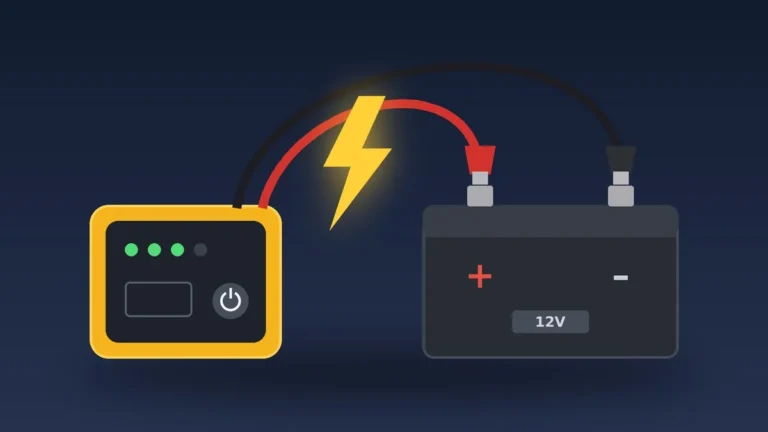
- 12V socket (cigarette lighter): the simplest setup. The camera usually turns off when the car does.
- USB port: some compact cameras run from a USB power source.
- Hardwire kit: connects to the fuse box and enables parking mode. Many kits include a low-voltage cutoff to help protect the car battery.
- OBD power cable: plugs into the diagnostic port for constant power without touching the fuse box.
- Dedicated battery pack: powers parking mode without drawing from the car battery.
Supercapacitor vs Battery
Many dash cams use a supercapacitor instead of a lithium-ion battery. A supercapacitor only stores enough power to finish saving the last clip when the car shuts off, but it’s generally more tolerant of the heat inside a parked car. Battery-powered cameras can run briefly on their own but may be more sensitive to extreme temperatures. Check the manufacturer’s operating temperature range either way.
How Parking Mode Works
With constant power, many dash cams can keep watch while you’re parked:
- Impact detection: the camera wakes and records when the G-sensor detects a bump.
- Motion detection: it records when something moves in front of the lens.
- Time-lapse: it records continuously at a low frame rate to save space.
Some cameras, like Garmin’s 67W, can also send alerts to your phone, though that feature needs a Wi-Fi connection.
Affiliate disclosure: As an Amazon Associate I earn from qualifying purchases.

- Pocket-sized dash camera goes virtually unnoticed on your windshield; automatically records and saves video of incidents with GPS location, date and time
- Extra-wide 180-degree lens captures more of the environment, and records 1440p HD video with Garmin Clarity HDR optics for crisp detail day and night
- Voice control (only available in English, German, French, Spanish, Italian and Swedish) lets you use spoken commands to save video, start/stop audio recording, take still pictures and more
- Saved videos automatically upload via Wi-Fi connection to the secure online Vault to view and share later
- The Parking Guard feature monitors activity around your parked vehicle and alerts if an incident is detected (requires Wi-Fi connection; access via the Garmin Drive app on your compatible smartphone)
How You Get the Footage Off the Camera
- Memory card: remove the microSD card and plug it into a computer.
- Wi-Fi app: many cameras create their own Wi-Fi network so you can download clips to your phone.
- Cloud upload: some models upload saved clips to an online account when connected to Wi-Fi.
Front, Rear, and Multi-Channel Cameras
A single-channel camera records the road ahead. Dual-channel systems add a rear camera, usually connected by a cable to the main unit. Three-channel systems add a cabin camera, and four-channel systems aim for 360° coverage. All the cameras save to the same memory card.

- 【Dual STARVIS 2 Sensors】The A229 Plus is the first Front and Rear dashcam to feature two Sony STARVIS 2 IMX675 image sensors. This advanced technology offers 2.5 times dynamic range and 2.5 times light sensitivity compared to STARVIS, resulting in reduced noise and motion blur during night recording. The A229 Plus provides the ultimate solution for capturing clear and detailed footage, making it a revolutionary addition to any driver's safety toolkit.
- 【HDR Front & Rear Recording】The A229 Plus dash camera is a game-changer in the industry, setting the standard for dashcams with its advanced Dual-Channel HDR technology. This reveals accurate 2K details even in fast-moving scenarios, and its exceptional ability to capture car license details makes it stand out from the competition. (Note: The front cam 1440P 60fps is not available while HDR is enabled. )
- 【2-channel 1440P recording】The A229 Plus dashcam offers upgraded 2K + 2K front and rear recording capabilities with 1440P resolution for high-definition recording effects. This innovative dash camera provides exceptional clarity and color saturation, enabling true 1440P detail reproduction and enhanced color accuracy. The front camera has a high frame rate of up to 60fps, ensuring crystal-clear images, accurate color representation, and perfectly balanced exposure levels.
- 【Hands-free Voice Control & Notification】Go hands-free with the A229 Plus dashcam's 12 voice commands, including take photo, lock the video, turn on WiFi, and show front/rear camera and so on. A229 Plus Dual channel dashcam also provides clear notifications for settings changes or memory card errors, keeping you focused on the road and enabling you to control your dashcam easily and safely.
- 【Ultra-Precise GPS】The A229 Plus is equipped with a state-of-the-art Quad-Mode GPS module that supports 4 satellite positioning systems: GPS, BEIDOU, GALILEO, and GLONASS. This advanced feature significantly enhances the accuracy and stability of the positioning. lt provides detailedlocation, speed, and time data of the vehicle when playing back the video on VIOFO App or computer.
To compare complete systems, see our list of the best rated dash cams.
Frequently Asked Questions
Do dash cams record all the time?
They record whenever they have power, usually while the car is on. With parking mode and constant power, they can also record while parked.
How long does a dash cam keep footage?
Until loop recording overwrites it. How long that takes depends on the card size, resolution, and how many cameras are recording. Locked clips are kept until you delete them.
Do dash cams drain the car battery?
Not when they shut off with the car. In parking mode they draw power continuously, which is why hardwire kits often include a low-voltage cutoff.
Do dash cams record audio?
Most can, and you can usually turn audio off. Recording laws vary, so check your local rules, especially if you carry passengers.
The Takeaway
A dash cam records constantly on a loop, protects important clips with a G-sensor, and powers on with your car. Add a hardwire kit for parking mode, and pick a camera with a good low-light sensor for clear night footage.





One Comment