How to Install a Rear View Camera on a Car: Mirror Monitor Method
JupiterVehicles is reader-supported. As an Amazon Associate, we earn from qualifying purchases.
A rear view camera kit built around a mirror monitor is one of the neatest upgrades for an older car. The mirror shows a live rear camera feed, switches to a backup view when you reverse, and many models record like a dash cam. This guide covers installing that type of kit.
If you’re installing a camera with a separate dash monitor instead, see how to install a backup camera.
Table of Contents
What’s in a Mirror Rear View Camera Kit
- A mirror monitor that straps over your existing mirror (or replaces it)
- A front camera built into the mirror, on dash cam models
- A rear camera with a long cable
- A power cable (12V adapter or hardwire kit)
- Mounting straps, adhesive and cable clips
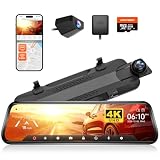
- [Smart 4K Mirror Dash Cam] WOLFBOX G930 model offers front 4K and rear 1080P resolution. You can easily slide the screen up and down to change the viewing angle, and swipe left and right to choose between the front and back split-screen images or the rear image.The streaming media rearview mirror gives a broader field of vision and clear images compared to conventional rearview mirrors, making driving safer
- [Enhanced 5.8GHz WiFi Connectivity] This rearview mirror camera features an upgraded 5.8GHz WiFi system for seamless and stable connections. With the WOLFBOX app, you can easily connect to the G930 dash cam mirror via WiFi, enabling quick video downloads and effortless sharing. This advanced high-speed WiFi ensures smooth access to your video files
- [WDR & Super Night Vision] The WOLFBOX mirror dash camera features low-reflectivity LCD screen to reduce glare in bright daylight. Equipped with advanced WDR technology, it effectively balances light exposure, ensuring clear visuals in high-contrast environments. Paired with a premium 6-glass lens, this camera delivers exceptional image quality, making driving in low-light or challenging lighting conditions safer and more comfortable
- [GPS Tracking Always On] You can see real-time speed and direction on the screen once the GPS receiver is inserted into the rear view mirror dash cam. With WOLFBOX dash cam, you can obtain valid GPS information by reviewing all recorded videos on the GPS Player
- [Loop Recording and G-Sensor Function] Provides safe and uninterrupted recording monitoring while you're away. Every 1/2/3 minute, the WOLFBOX mirror camera for car records in loop, overwriting older footage with fresh footage. You can find reliable evidence in the locked video since the G-sensor immediately locks the current video when it detects a collision
The WOLFBOX G930 is a popular example, with a 10-inch screen, 4K front recording, a rear camera and a 64GB card.
Step 1: Fit the Mirror Monitor
Strap the mirror monitor over your stock mirror with the included bands. Center it and make sure it doesn’t block your view or rattle. For a factory look, some kits replace the mirror entirely, like the AUTO-VOX OEM mirror.
Step 2: Route the Power Cable
Tuck the power cable along the headliner, down the A-pillar (behind the airbag, never across it) and to the 12V socket or fuse box. Hardwiring enables parking mode on dash cam models. See how to hardwire a dash cam.
Step 3: Choose the Rear Camera Spot
Mirror kits usually offer two choices:
- Inside the rear window: easy and protected from weather, but can be blocked by tint, wipers or headrests.
- Outside at the license plate: better backup view and works as a true backup camera, but needs routing into the car.
Step 4: Route the Rear Camera Cable
Run the cable from the mirror along the headliner to the back, tucking it under trim. For an exterior camera, pass it through the trunk or liftgate boot. Keep it clear of curtain airbags.
Step 5: Connect Reverse Power
Most rear cameras have a red wire for the reverse light. Connecting it to reverse-light positive makes the mirror switch to a full backup view with guidelines when you reverse. Our reverse camera wiring guide covers finding that wire.
Step 6: Set Up and Test
- Turn the car on and check both camera views.
- Adjust the rear camera angle and image orientation.
- Shift into reverse and confirm the backup view and guidelines.
- Set recording, parking mode and time if it’s a dash cam model.
Legal and Safety Notes
- Check that the mirror monitor doesn’t block your view through the windshield.
- Some states have rules about recording audio or where devices mount. See are dash cams legal.
- NHTSA’s rear visibility rule announcement explains why backup views matter: an average of 210 deaths and 15,000 injuries a year from backover crashes.
Frequently Asked Questions
Can I install a rear view mirror camera myself?
Yes. Strap-on mirror kits are a common DIY job, mostly about hiding cables neatly.
Does a mirror camera need to be wired to the reverse light?
Only if you want it to switch to a backup view with guidelines automatically.
Should the rear camera go inside or outside?
Inside is easier and protected. Outside gives a better backup view.
Will a mirror monitor work in any car?
Strap-on models fit most mirrors. Check size and sensor placement around the mirror base.
The Bottom Line
To install a rear view camera on a car with a mirror kit, strap on the mirror monitor, hide the power cable, mount the rear camera inside or at the plate, route its cable, and wire the reverse trigger. Test every view before you reinstall the trim.