
How to Check Check Engine Light Codes: 3 Easy Ways
To check your check engine light codes, connect an OBD2 scanner or Bluetooth reader to the port under your dashboard, turn the ignition on, and read the codes, or have them read for free at an auto parts store that offers the service. The code (for example, P0455) tells you which system triggered the light. Before anything else, notice whether the light is steady or blinking: a blinking light needs attention sooner.
Here are three ways to get the codes, and what to do next.
Table of Contents
First: Is the Light Steady or Blinking?
| Light | What it generally means | What to do |
|---|---|---|
| Steady | A fault has been detected | Check the codes soon and plan a repair |
| Blinking | A more severe malfunction | Reduce driving and get it checked promptly |
The California Air Resources Board notes that certain malfunctions can cause the warning light to blink, and that many manufacturers recommend having the vehicle serviced as soon as possible in that case, because some faults can damage the catalytic converter.
If the car is overheating, losing power, or running roughly, pull over safely and get help.
Way 1: Use Your Own OBD2 Scanner
- Find the 16-pin OBD2 port under the dashboard, usually near the steering column.
- Plug in the scanner with the car off.
- Turn the ignition on, or start the engine if the scanner’s instructions say to.
- Select Read Codes and write down every code.
- Look up each code using the scanner’s definitions or a reliable repair source.
Owning a scanner means you can check codes any time, confirm repairs, and check emissions readiness. See how to use an OBD2 scanner for the full process.
Affiliate disclosure: As an Amazon Associate I earn from qualifying purchases.

- Two Essential Car Checks with One Tool — The FOXWELL NT301 Plus keeps the engine code reading and clearing you know and adds a full 12V battery health, cranking, and charging tests in one handheld tool. The 2.8-inch color display makes results easy to view. Ideal for DIYers, car owners, home mechanics, and used-car inspections—check engine codes and battery health with one tool before a shop visit
- Understand the Check Engine Light — This code scanner reads engine codes and displays their definitions, helping you understand the issue before visiting a repair shop. View live data such as RPM, coolant temperature, and fuel trim to help investigate the cause. Fix the issue before clearing codes
- Check Battery Health Before It Fails — The built-in car battery tester checks 12V lead-acid Flooded, AGM (flat or spiral), EFB, and GEL batteries for SOH, SOC, cranking performance, and charging output. Check before a trip, after a jump-start, when a new battery keeps dying, or after the vehicle has been sitting. Use the results to help decide whether to recharge, replace, or keep the battery. Firmly connect the battery cable to the OBDII cable before testing
- See What Your Engine Is Doing: This car diagnostic tool displays live engine data, including RPM, sensor readings, and fuel trim, to help investigate intermittent issues. Record and replay data, then print diagnostic reports from a Windows PC
- Know Your S-m-o-g Status & Find EVAP Leaks — Whether you're buying used, chasing a stubborn check engine light, or just want to be sure you'll pass your next s-m-o-g check—this car scanner diagnostic tool can give you answers. Run the I/M readiness test, check for stored codes, and test battery health. Also works for EVAP leak detection—loose gas cap or cracked hose, you'll know before the shop tells you
Way 2: Use a Bluetooth Scanner and Phone App
A small Bluetooth adapter plugs into the port and sends codes to an app on your phone. Many apps explain codes in plain language and suggest likely causes. Some features may require a subscription, so check before you buy.
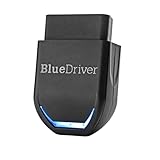
- [Diagnose Like a Pro] BlueDriver Pro is a professional OBD2 scanner and diagnostic tool that helps you scan, understand, and clear vehicle trouble codes with confidence. Turn your phone into a powerful car diagnostic scanner—no guesswork, no unnecessary repairs.
- [Read and Clear More Codes Than Ever] Read and clear more codes than basic car code readers. Access enhanced diagnostics for Check Engine, ABS, SRS, Airbag, TPMS, Transmission, and more on supported vehicles, including expanded coverage on newer model years.
- [Verified Fixes and Real-Time Data] Get unlimited, technician-verified repair reports matched to your VIN, with definitions, causes, and confirmed fixes. Monitor live vehicle data as you drive, view freeze frames, check smog readiness, and analyze Mode 6 test results.
- [Expanded Make & Model Coverage] Optimized for today's vehicles with strong support for GM, Ford, Stellantis (RAM, Jeep, Chrysler), Toyota, Honda, Nissan, Mazda, Subaru, Hyundai, Mercedes-Benz, BMW, and VW. Enhanced communication on select 2024+ Nissan and Mazda models (see compatibility chart).
- [Gas Vehicles 1996+ & Select Light-Duty Trucks] Works with all gas-powered vehicles made in 1996 or newer, plus select light-duty trucks and diesels, including F-250, RAM 2500, Silverado, and Sierra. Built for daily drivers, family vehicles, and real-world truck use.
Way 3: Get a Free Scan at an Auto Parts Store
Some auto parts chains, such as AutoZone, advertise free check engine light code reading. Call ahead to confirm the service at your local store. Ask for a printout or photo of the codes, not just a part recommendation.
What to Do After You Have the Code
- Write down every code, including pending ones.
- Look up the meaning. Codes start with P, B, C, or U. Our guide on how to use a car code reader explains how to decode them.
- Check the simple things first. EVAP codes, for example, can sometimes be caused by a loose or damaged fuel cap.
- Decide on the repair. Some fixes are DIY-friendly; others need a professional diagnosis.
- Clear the code after repairing, then watch whether it returns.
Common Reasons the Check Engine Light Comes On
- Loose or faulty fuel cap (EVAP codes)
- Oxygen sensor faults
- Engine misfires from spark plugs or ignition coils
- Mass airflow sensor issues
- Catalytic converter efficiency codes
These are general patterns. The right fix depends on your vehicle and the exact code.
Frequently Asked Questions
Can I drive with the check engine light on?
If it’s steady and the car drives normally, you can usually drive carefully while you arrange a diagnosis. If it’s blinking or the car runs poorly, reduce driving and get it checked promptly.
Can I check codes without a scanner?
Some vehicles can display codes through the instrument cluster, but methods vary by make and model and aren’t universal. A scanner or a free parts-store scan is the most reliable option.
Will disconnecting the battery clear the check engine light?
It may clear codes on some vehicles, but it doesn’t fix the problem and can reset other settings. Using a scanner is a better way to clear codes after a repair.
Why did my check engine light turn off by itself?
Some faults are intermittent. If the condition stops, the car may turn off the light after several drive cycles, but the code may remain stored.
The Takeaway
Checking your check engine light codes is easy with a scanner, a Bluetooth app, or a free parts-store scan. Note whether the light is blinking, record the codes, and use them as a starting point for diagnosis, not a final verdict.
For scanner recommendations, see our list of the best OBD2 scanners.


2 Comments